

Code Scanner — Standalone Usage
Run the CoreFix code scanner on any machine with Docker installed. No other dependencies required.
Current version: v1.0.0 · Commit: 26141d48
New Scanners Now Live
- Container Scanning - vulnerabilities in your container images
- CIS Benchmarking for Dockerfiles
- Malware & Supply Chain Risk Detection for packages
- SonarQube Integration for security hotspots, code smells, and bugs
- AI Governance Scanner and AI BOM — AI Bill of Materials and governance scan across source code
- SBOM Generator — Software Bill of Materials for your project
Pull the Image
Docker Hub
docker pull corefixhq/cfix               # latest
docker pull corefixhq/cfix:latest        # latest (explicit)
docker pull corefixhq/cfix:1.0.0         # specific version
docker pull corefixhq/cfix:26141d48 # specific commit SHA→ hub.docker.com/r/corefixhq/cfix
Quick Start
docker run --rm \
  -e X_CFIX_API_KEY==<your-api-key> \
  -v $(pwd):/code \
  -v ~/scan-results:/output \
  corefixhq/cfix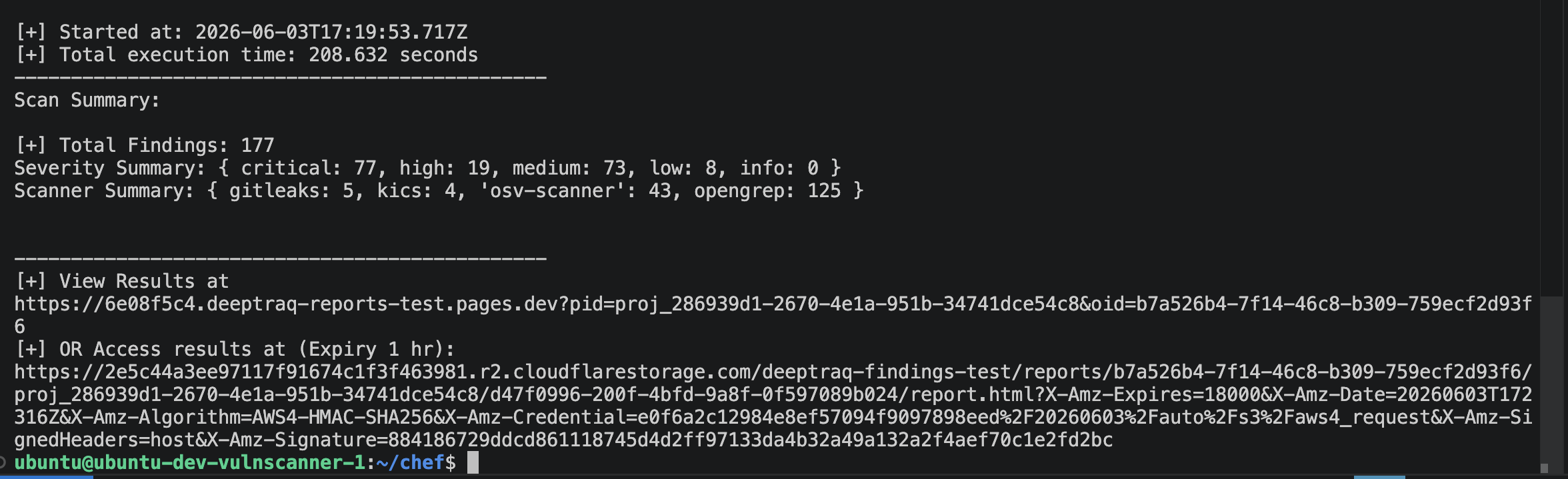
Full Command Reference
docker run --rm \
  -e X_CFIX_API_KEY=<your-api-key> \
  [-e GITHUB_TOKEN=<github-pat>] \
  -v $(pwd):/code \
  -v <output-dir>:/output \
  corefixhq/cfix [scanners] \
  [--openai-api-key <key>] \
  [--model <model-name>] \
  [--ignore-ai-analysis] \
  [--github-token <github-pat>] \
[--container <images>]The screenshot below shows the command being run from the root folder of a repository — in this case a Chef repo is used as the target.

Environment Variables
| Variable | Required | Description |
|---|---|---|
X_CFIX_API_KEY | Yes | Your CoreFix API key. Found in Account & API Keys |
GITHUB_TOKEN | No | GitHub PAT for uploading results as SARIF to GitHub Code Scanning |
Volume Mounts
| Mount | Description |
|---|---|
-v $(pwd):/code | Mounts your project root (source code or repo) into the container at /code. Run from your repository root. |
-v ~/scan-results:/output | Local directory where scan reports are written after the scan completes |
Scanners
Pass a comma-separated list as the first argument. Defaults to all scanners if omitted: osv,iac,secrets,k8s,sast,sonar,container,ai,malware
| Value | Tool | What it finds |
|---|---|---|
sast | OpenGrep | Code vulnerabilities across 30+ languages |
secrets | Gitleaks | Hardcoded credentials, API keys, tokens |
osv | OSV-Scanner | Dependency CVEs with reachability analysis |
iac | KICS | Terraform, Dockerfile, Helm, CloudFormation misconfigs |
k8s | Kubescape | Kubernetes RBAC, pod security, CIS benchmarks |
sonar | SonarQube | Security hotspot, bug, code smell, and vulnerability rules |
container | CoreFix Container Scanner | Container image vulnerabilities and Dockerfile CIS benchmarking |
ai | AI BOM / AI Governance Scanner | AI Bill of Materials (AI BOM) and AI governance scan across source code |
sbom | SBOM Generator | Software Bill of Materials for the scanned project |
malware | CoreFix Malware Scanner | Malware within Python, NPM (JS), Golang, Ruby gems, GitHub Actions, and VS Code extensions, plus cross-package supply chain risk detection |
Automatic SBOM Generation
On your main branch, an SBOM is generated automatically by default — you don't need to pass sbom yourself.
- A full source-code SBOM is generated from a directory scan of your entire repository.
- If containers are present on the host, passed via
--container, or taggedcfix, a container SBOM is generated automatically for each of those images. - If the
aiscanner is included in the run, an AI Bill of Materials (AI BOM) is also generated alongside the source SBOM.
AI Models
CoreFix automatically selects an AI model for enrichment based on your account. You don't need to configure anything — but you can override if needed.
If you don't specify a model or API key:
- Open source plan → a standard model is randomly selected from the open source pool
- Paid plan → a premium model is randomly selected for higher quality enrichment
If you specify --model without --openai-api-key:
- Paid plan → that model is used if supported
- Open source plan → the model flag is silently ignored and a standard model is selected
If you specify --openai-api-key:
--modelis required. The scan will fail without it.- The specified model is used via your key. You pay your provider directly.
- See Supported Models → for the full list of models available with BYOK.
# BYOK — must include --model
--openai-api-key sk-proj-xxxxxxxx --model gpt-4o-miniSkip AI analysis entirely:
Pass --ignore-ai-analysis to skip the AI pipeline — this covers deduplication, enrichment of findings, and AI-based prioritization. Raw and normalized findings are still written to /output, but no enriched report or AI-based prioritization is generated.
CLI Options
--openai-api-key (optional)
Your own OpenAI-compatible API key. Requires --model. See AI Models above.
--model (optional)
Override the AI model used for enrichment. See Supported Models.
--ignore-ai-analysis (optional)
Skip the AI pipeline — deduplication, enrichment of findings, and AI-based prioritization are all skipped. Useful for faster runs, or when you only need raw/normalized findings without AI enrichment. Cannot be combined meaningfully with --openai-api-key / --model, since there is no enrichment step to run those against.
--github-token (optional)
GitHub Personal Access Token for uploading scan results as a SARIF file to GitHub Code Scanning. Can also be passed as the GITHUB_TOKEN environment variable.
# As a flag
--github-token ghp_xxxxxxxxxxxx

# As an environment variable (preferred for CI)
-e GITHUB_TOKEN=${{ secrets.GITHUB_TOKEN }}--container (optional)
--container
  Specify container names for scanning, as a comma-separated list.
  Type: string
Default: falseExample — comma-separated image names:
nginx,redis:v6.2.0,postgres:latestIf --container is not passed, the container scanner defaults to scanning the first 3 images returned by docker images on the host.
You can also opt an image into scanning by tagging it cfix — every image with a cfix tag is picked up automatically:
docker tag <YOUR-CONTAINER>:latest cfixExamples
All scanners
docker run --rm \
  -e X_CFIX_API_KEY=cfix_live_xxxxxxxx \
  -v $(pwd):/code \
  -v ~/scan-results:/output \
corefixhq/cfixSpecific scanners only
# Secrets and SAST
docker run --rm \
  -e X_CFIX_API_KEY=cfix_live_xxxxxxxx \
  -v $(pwd):/code \
  -v ~/scan-results:/output \
  corefixhq/cfix secrets,sast

# Dependencies and IaC only
docker run --rm \
  -e X_CFIX_API_KEY=cfix_live_xxxxxxxx \
  -v $(pwd):/code \
  -v ~/scan-results:/output \
  corefixhq/cfix osv,iac

# Sonar, AI BOM/Governance, SBOM, and malware scanning
docker run --rm \
  -e X_CFIX_API_KEY=cfix_live_xxxxxxxx \
  -v $(pwd):/code \
  -v ~/scan-results:/output \
corefixhq/cfix sonar,ai,sbom,malwareBring your own API key
docker run --rm \
  -e X_CFIX_API_KEY=cfix_live_xxxxxxxx \
  -v $(pwd):/code \
  -v ~/scan-results:/output \
  corefixhq/cfix \
  --openai-api-key sk-proj-xxxxxxxx \
--model gpt-4o-miniSkip AI analysis
docker run --rm \
  -e X_CFIX_API_KEY=cfix_live_xxxxxxxx \
  -v $(pwd):/code \
  -v ~/scan-results:/output \
  corefixhq/cfix \
--ignore-ai-analysisContainer scanning with --container
Docker Socket Mount Required
For container scanning, you must mount the Docker socket with -v /var/run/docker.sock:/var/run/docker.sock. This lets the scanner talk to your local Docker daemon to pull/inspect images directly, so it can scan them without needing any credentials to your container registry.
docker run --rm \
  -e X_CFIX_API_KEY=cfix_live_xxxxxxxx \
  -v $(pwd):/code \
  -v ~/scan-results:/output \
  -v /var/run/docker.sock:/var/run/docker.sock \
  corefixhq/cfix container \
--container nginx,redis:v6.2.0,postgres:latestContainer scanning via the cfix tag
# Tag the images you want scanned
docker tag myapp:latest cfix
docker tag myapp-worker:latest cfix

# Run the container scanner — no --container flag needed,
# every image tagged "cfix" is picked up automatically
docker run --rm \
  -e X_CFIX_API_KEY=cfix_live_xxxxxxxx \
  -v $(pwd):/code \
  -v ~/scan-results:/output \
  -v /var/run/docker.sock:/var/run/docker.sock \
corefixhq/cfix containerUpload results to GitHub Code Scanning
docker run --rm \
  -e X_CFIX_API_KEY=cfix_live_xxxxxxxx \
  -e GITHUB_TOKEN=ghp_xxxxxxxxxxxx \
  -v $(pwd):/code \
  -v ~/scan-results:/output \
corefixhq/cfix- Example of Logs showing successful sarif upload.
[*] Uploading 51 findings to GitHub...
[*] Repo: chef Branch: main Commit: d1e9ce21e1f7925b9c489aa137ffd57bb788b87f
[+] SARIF accepted. Status URL: https://api.github.com/repos/mai1x9/chef/code-scanning/sarifs/e98d6b64-5f70-11f1-9ac1-06c8a1baee39
[*] SARIF processing status: complete
[+] SARIF processing complete. Errors: []
[+] SARIF uploaded to GitHub Security tab
https://github.com/mai1x9/chef/security/code-scanningFull example with all options
docker run --rm \
  -e X_CFIX_API_KEY=cfix_live_xxxxxxxx \
  -e GITHUB_TOKEN=ghp_xxxxxxxxxxxx \
  -v $(pwd):/code \
  -v ~/scan-results:/output \
  corefixhq/cfix secrets,sast,osv \
  --openai-api-key sk-proj-xxxxxxxx \
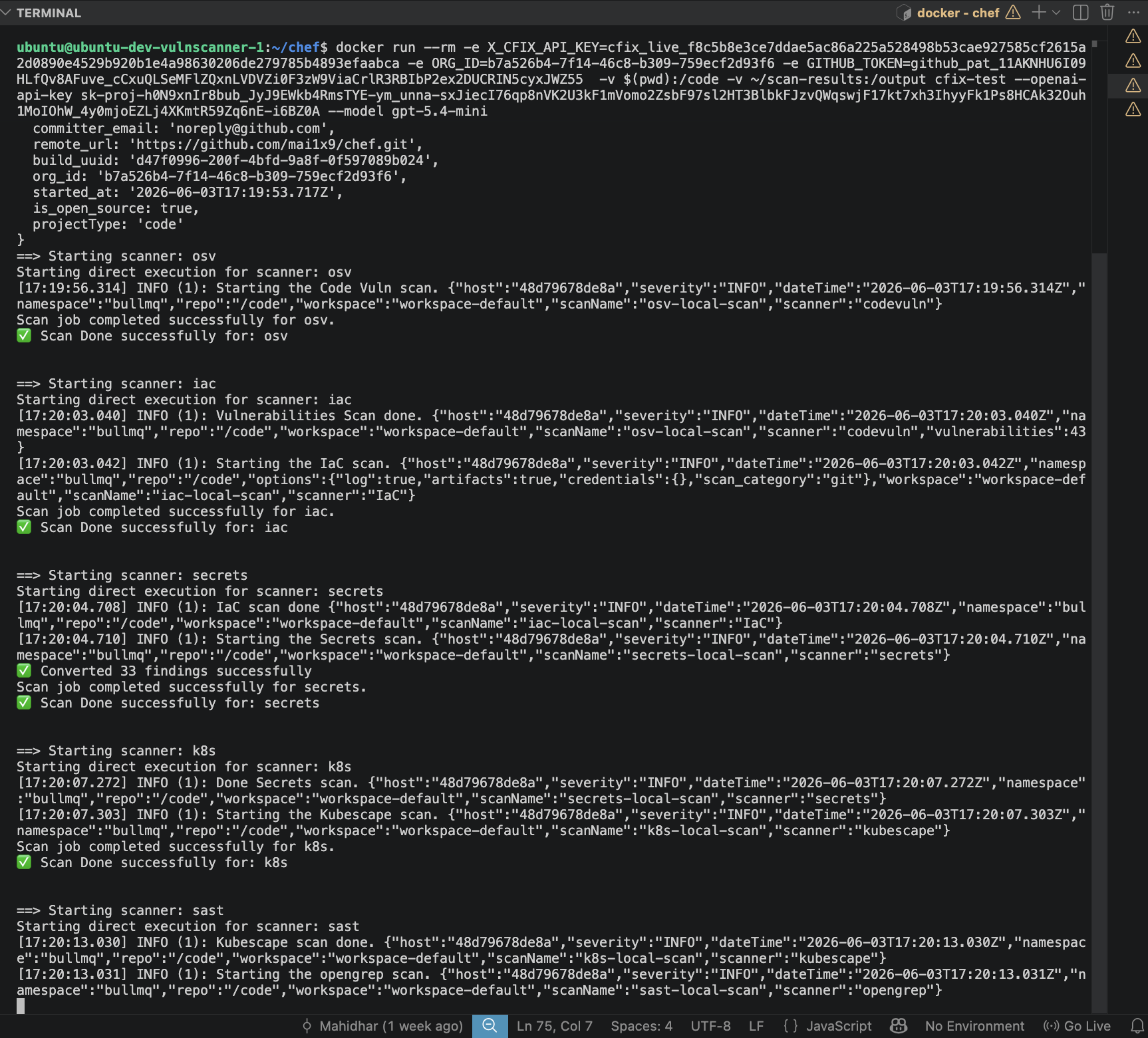
--model gpt-4o-mini- Below Screenshot shows successful run of the scanners and results being sent for AI for enrichment.
Pin to a specific version
docker run --rm \
  -e X_CFIX_API_KEY=cfix_live_xxxxxxxx \
  -v $(pwd):/code \
  -v ~/scan-results:/output \
  corefixhq/cfix:1.0.0